CURRENTLY SEEKING PRODUCT DESIGN, PRODUCT OPERATIONS AND UX OPPORTUNITIES
CURRENTLY SEEKING PRODUCT DESIGN, PRODUCT OPERATIONS AND UX OPPORTUNITIES
Verification Workflow
Project Overview
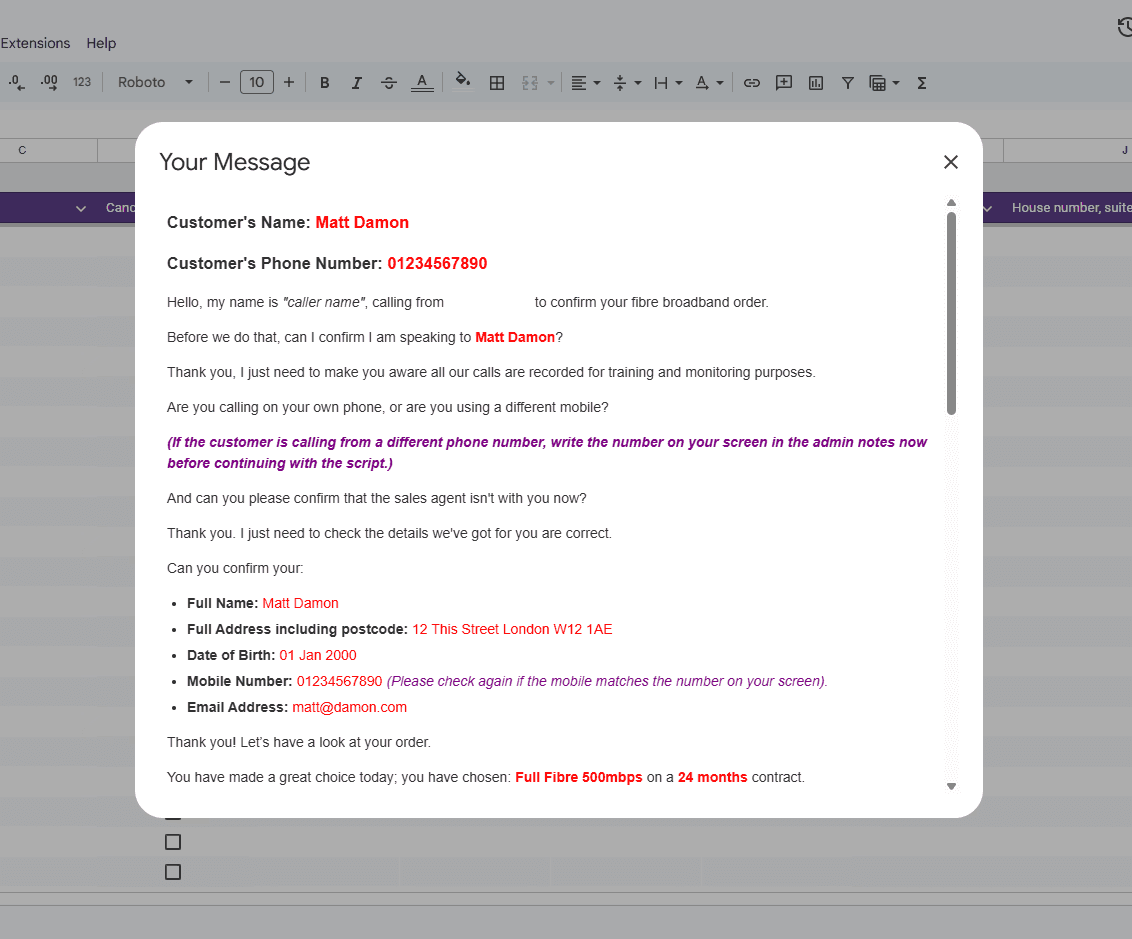
Designed an internal workflow that replaced a manual email process with a structured, automated verification system for door-to-door sales. The solution guided sales agents through submitting accurate information, then automatically generated a personalised verification script for the verification team, reducing delays, human error and manual effort.
Designed an internal workflow that replaced a manual email process with a structured, automated verification system for door-to-door sales. The solution guided sales agents through submitting accurate information, then automatically generated a personalised verification script for the verification team, reducing delays, human error and manual effort.
Google Sheets

Apps Script
The Problem
Door-to-door sales relied on a manual email process to send customer details to the verification team. Although email templates were available, information was often missing, inconsistently formatted or delayed due to poor mobile signal, slowing down the verification process and occasionally resulting in lost sales.
Even after the information reached the verification team, agents had to search through large spreadsheets to piece together the customer's details before making the call. This added unnecessary friction to a process that needed to be fast, accurate and consistent.
The Goal
Create a faster and more reliable verification process by guiding sales agents through submitting complete and consistent information, while making it effortless for verification agents to access exactly what they needed during customer calls.
The aim was to reduce manual effort, minimise errors and create a workflow that felt seamless for both teams.
Design Decisions
Rather than relying on free-text emails, I replaced the process with a structured Google Form containing predefined options wherever possible. This reduced formatting inconsistencies and ensured required information couldn't easily be missed.
The submitted information flowed into Google Sheets, where I used Apps Script and HTML to automatically generate a tailored call script for each customer. The script adapted dynamically based on the products and services selected, only displaying information that was relevant to that individual sale.
A simple "Generate Script" dropdown triggered the process, allowing verification agents to produce a complete, formatted script with a single click before automatically resetting for the next customer.
The Solution
The final workflow reduced the number of manual steps for both teams while improving consistency throughout the verification process.
Sales agents completed a guided form instead of writing emails, ensuring submissions were complete and standardised. Verification agents no longer needed to search across multiple spreadsheet columns, as the generated script presented the customer's information in a clear conversational format, ready to read during the phone call.
By designing the process around the users rather than the underlying data, the system became faster, easier to use and far less prone to human error.
Key Takeaways
This project reinforced that improving a user experience isn't always about redesigning an interface. Sometimes the biggest improvements come from simplifying the workflow behind it.
What I took away most from this project:
Reducing manual input greatly improves consistency and accuracy.
Small automations can remove significant friction from repetitive tasks.
Good workflow design considers every user involved in the process, not just the primary user.
Presenting information in the order users naturally need it is often more valuable than simply displaying the raw data.
The best internal tools reduce cognitive load by doing the thinking behind the scenes.

The Problem
Door-to-door sales relied on a manual email process to send customer details to the verification team. Although email templates were available, information was often missing, inconsistently formatted or delayed due to poor mobile signal, slowing down the verification process and occasionally resulting in lost sales.
Even after the information reached the verification team, agents had to search through large spreadsheets to piece together the customer's details before making the call. This added unnecessary friction to a process that needed to be fast, accurate and consistent.
The Goal
Create a faster and more reliable verification process by guiding sales agents through submitting complete and consistent information, while making it effortless for verification agents to access exactly what they needed during customer calls.
The aim was to reduce manual effort, minimise errors and create a workflow that felt seamless for both teams.
Design Decisions
Rather than relying on free-text emails, I replaced the process with a structured Google Form containing predefined options wherever possible. This reduced formatting inconsistencies and ensured required information couldn't easily be missed.
The submitted information flowed into Google Sheets, where I used Apps Script and HTML to automatically generate a tailored call script for each customer. The script adapted dynamically based on the products and services selected, only displaying information that was relevant to that individual sale.
A simple "Generate Script" dropdown triggered the process, allowing verification agents to produce a complete, formatted script with a single click before automatically resetting for the next customer.
The Solution
The final workflow reduced the number of manual steps for both teams while improving consistency throughout the verification process.
Sales agents completed a guided form instead of writing emails, ensuring submissions were complete and standardised. Verification agents no longer needed to search across multiple spreadsheet columns, as the generated script presented the customer's information in a clear conversational format, ready to read during the phone call.
By designing the process around the users rather than the underlying data, the system became faster, easier to use and far less prone to human error.
Key Takeaways
This project reinforced that improving a user experience isn't always about redesigning an interface. Sometimes the biggest improvements come from simplifying the workflow behind it.
What I took away most from this project:
Reducing manual input greatly improves consistency and accuracy.
Small automations can remove significant friction from repetitive tasks.
Good workflow design considers every user involved in the process, not just the primary user.
Presenting information in the order users naturally need it is often more valuable than simply displaying the raw data.
The best internal tools reduce cognitive load by doing the thinking behind the scenes.
